Don’t pay a fortune for apps. Everything here is free, and completely legal. See the apps

FreeFullSoft
macOS Free · full version Notarized by Apple Apple silicon + Intel

ConvertGuru

Convert audio, video, images, documents, email and comics on your Mac. Drop in a whole batch, pick the format you need, and every file is converted on the right route for its own type. 5,384 conversions between 121 formats, and your files never leave the Mac.

No account, no upload, no watermark, no file size limit. 599 of the conversions work the moment it opens; free engines that it installs for you add the rest.

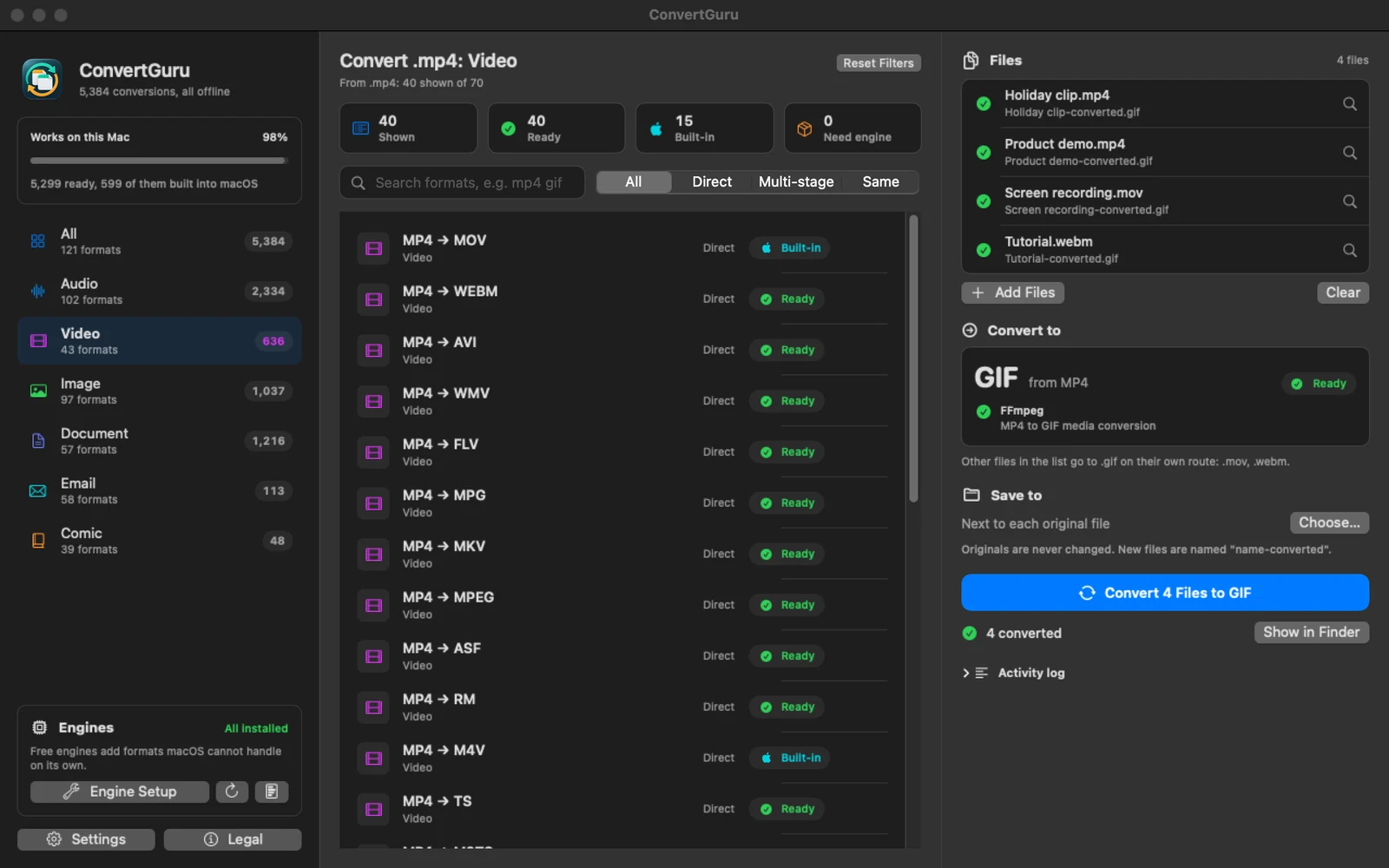
The ConvertGuru window: a list of video conversions on the left, and on the right four clips (two MP4, a MOV and a WebM) all converted to animated GIFs, each with a green tick.
Four clips converted to animated GIFs in one go. The MP4s take the route you picked; the MOV and the WebM each go to GIF on their own. A real run, drawn by the app itself.

What it does

A whole batch at once

Drop files or entire folders onto the window. Every file goes to the format you picked, on the best route for its own type, with progress for the batch and a Stop button.

Works the moment it opens

599 conversions use only what macOS already has: HEIC, JPEG, PNG and camera RAW photos, WAV, AIFF, M4A and FLAC audio, MOV and MP4 video, Word and OpenDocument files to PDF.

Camera RAW, developed by macOS

ARW, CR2, CR3, DNG, NEF, ORF, RAF, RW2 and SR2 photos become JPEG, PNG, TIFF or HEIC with Apple’s own RAW support, nothing to install.

Reads scanned PDFs

A PDF page with no text layer is read with Apple’s text recognition, on your Mac, so a scan still turns into plain text, Markdown or an editable Word file.

Free engines, installed for you

FFmpeg, LibreOffice, Pandoc, ImageMagick, unar and msgconvert add the remaining formats. One window installs them through Homebrew, and repairs one that stops starting after an upgrade.

Says what it needs

If a conversion needs an engine you do not have, ConvertGuru names it and installs it with one click. The conversion carries on by itself when the install is done.

Originals stay untouched

New files are saved as name-converted next to the original, or in a folder you choose. Nothing is ever overwritten.

Email and comics too

EML and Outlook MSG messages to a web page, PDF or text. CBZ, CBR and CBT comics to PDF or a cover image, and PDFs to CBZ.

Every step tested

Before release, all 2,380 distinct steps in the catalog were run on real files and every output was opened and checked. A conversion that cannot work says so up front.

Before you install anything

Your Mac already has excellent converters inside it: Core Audio, AVFoundation, ImageIO, the text system, PDFKit and Vision. ConvertGuru uses them first, so photos, sound, everyday video and office documents work on a Mac with nothing else installed.

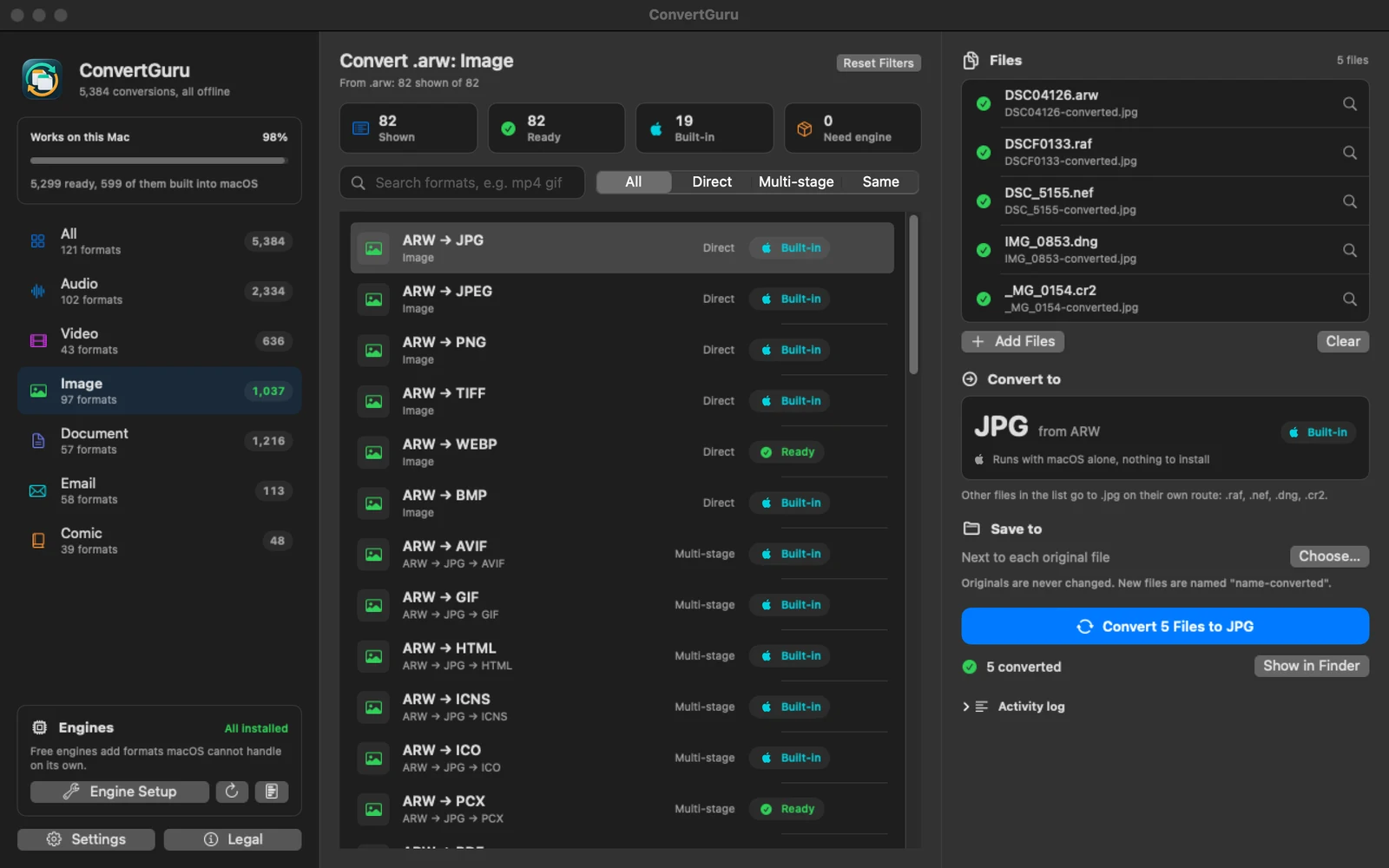
Five camera RAW photos (Sony ARW, Fujifilm RAF, Nikon NEF, Apple DNG and Canon CR2) converted to JPEG. The selected route is marked Built-in: runs with macOS alone, nothing to install.
Five RAW files from Sony, Fujifilm, Nikon, Apple and Canon cameras, developed into JPEG by macOS itself. The badge says Built-in: no engine is involved.

When a conversion needs more

The rest of the 5,384 conversions run on six free, open-source engines. ConvertGuru does not hide them inside itself: it installs each one from Homebrew when you ask, shows which engine a conversion uses, and tells you before a conversion would fail.

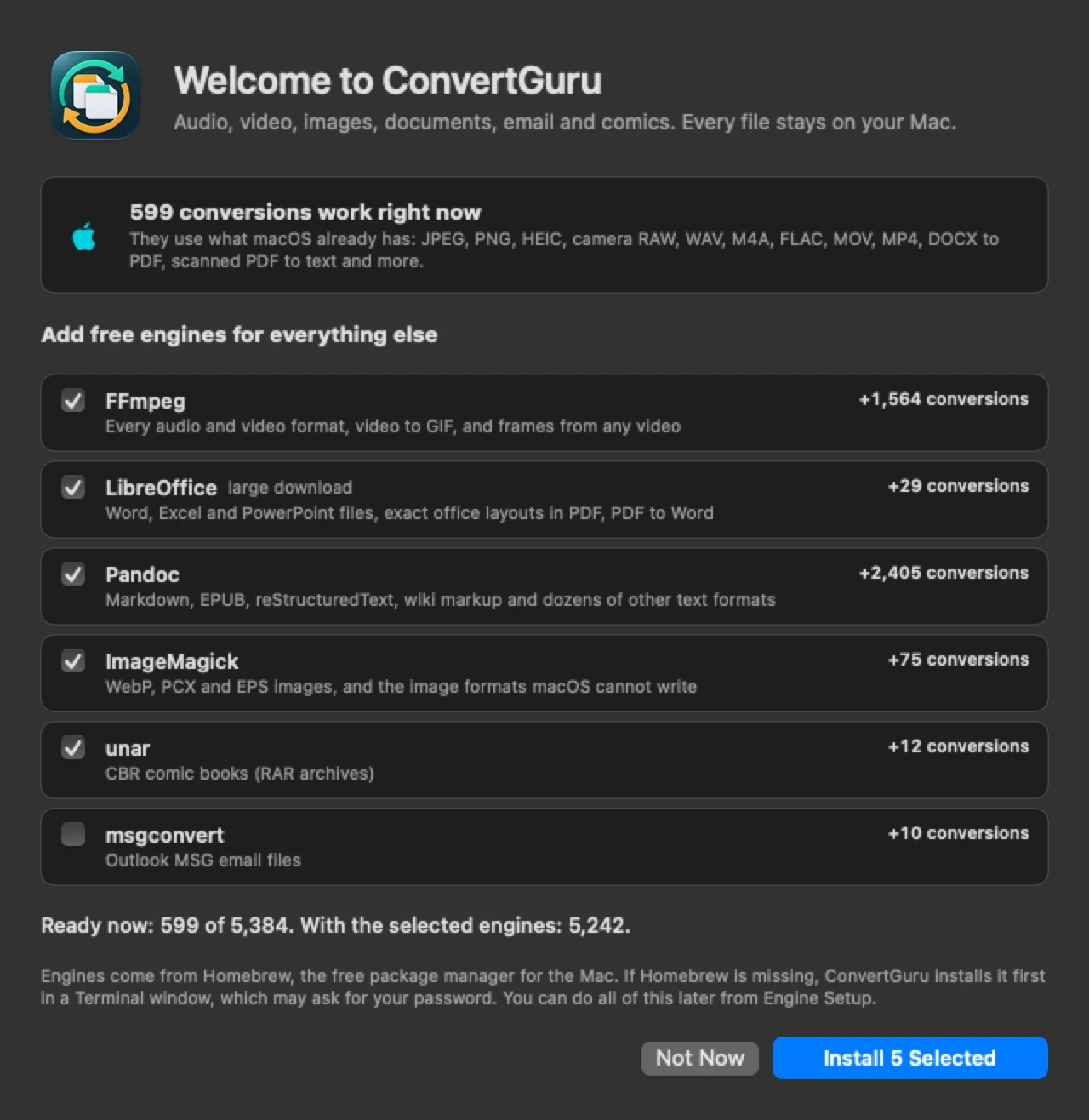
The welcome window: 599 conversions work right now, and a list of six free engines with a checkbox each and how many conversions each one adds.
First launch: what works already, and what each engine adds. One button installs the ticked ones.
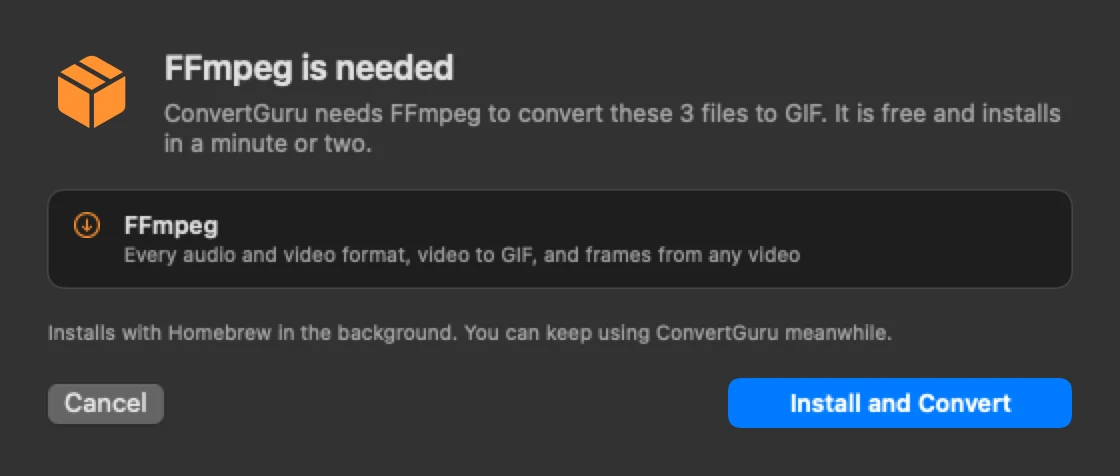
A window titled FFmpeg is needed, explaining that ConvertGuru needs FFmpeg to convert three files to GIF, with Cancel and Install and Convert buttons.
Convert, on a Mac without FFmpeg: it names the engine, installs it, then converts.
EngineAdds
FFmpegEvery audio and video format, video to GIF, frames from any video
PandocMarkdown, EPUB, reStructuredText, wiki markup and dozens of text formats
LibreOfficeWord, Excel and PowerPoint with their exact layout, PDF to Word and PowerPoint
ImageMagickWebP, PCX and EPS, and image formats macOS cannot write
unarCBR comics (RAR archives)
msgconvertOutlook MSG email

The engines are separate programs under their own licences (LGPL, GPL, MPL and others), installed on your Mac from Homebrew. ConvertGuru does not include or modify them.

121 formats

Search the list by typing two formats, such as mp4 gif or heic jpg, or drop a file and see everything it can become.

Audio

MP3, WAV, AAC, M4A, FLAC, OGG, Opus, AIFF, WMA, CAF, AU, WavPack, TTA, MKA, RealAudio, Sound Designer II, Ensoniq PARIS

Video

MP4, MOV, MKV, AVI, WebM, WMV, FLV, F4V, M4V, MPEG, TS, MTS, M2TS, VOB, OGV, ASF, RealMedia, animated GIF, and stills from any of them

Images

JPEG, PNG, HEIC, AVIF, WebP, TIFF, GIF, BMP, TGA, PCX, PSD, EPS, ICO, ICNS, and camera RAW: ARW, CR2, CR3, DNG, NEF, ORF, RAF, RW2, SR2

Documents

DOCX, ODT, RTF, PDF, TXT, HTML, Markdown and its variants, EPUB, reStructuredText, AsciiDoc, Org, MediaWiki, DocBook, Jupyter notebooks, slide decks, XLSX, ODS, CSV, PPTX

Email

EML and Outlook MSG, to a web page, PDF, plain text or an image, with the sender, date and subject kept

Comics

CBZ, CBR and CBT to PDF or a cover image, between each other, and PDF to CBZ or CBT
Tested on every format pair

A converter is only as good as its least-used route, so this release was checked the long way. The catalog’s 5,384 conversions are made of 2,380 distinct steps, such as MP4 to GIF or DOCX to PDF. Every one of them was run on real files, including photos from ten camera makers, and every output was opened again to check that it really is what its name says.

  • 5,299 of 5,384 conversions passed end to end with the free engines installed.
  • 599 of them passed again on macOS alone, with every engine switched off.
  • 85 are marked Unsupported instead: an animated GIF has no soundtrack to save as M4A, and old Panasonic .RAW files are not readable by any engine available. ConvertGuru says so before it starts.

Installing it

ConvertGuru is signed with an Apple Developer ID and notarized by Apple, so it installs like any other Mac app. No right-click trick, nothing to allow in System Settings.

  1. 1

    Open ConvertGuru-1.0.0.dmg and drag ConvertGuru onto Applications.

  2. 2

    Open it from Applications. macOS asks once whether you want to open an app downloaded from the internet; choose Open. One download runs natively on both Apple silicon and Intel Macs.

  3. 3

    The welcome window lists the free engines with the useful ones ticked. Press Install Selected, or Not Now to start with what macOS can do. If Homebrew, the free package manager the engines come from, is missing, it is installed first in a Terminal window, which may ask for your password.

  4. 4

    Drop your files on the window, pick the target format in the list, and press Convert. You can also drop files on ConvertGuru’s Dock icon or use Open With in the Finder.

Two questions macOS may ask. When you install an engine, whether ConvertGuru may control Terminal: it opens a Terminal window so you see the installer and its password prompt. And the first time you convert something on your Desktop or in Documents or Downloads, whether it may access that folder. Conversions never need anything else.

What it sends: nothing on its own

Every conversion happens on your Mac. ConvertGuru never uploads a file and uses no online conversion service; even scanned pages are read on the Mac. It makes a network request only when you ask it to.

  • No analytics, no account, no advertising
  • Your files are read and written on your Mac only
  • Check for Updates reads one small file from freefullsoft.com, only when you choose it
  • Installing an engine downloads it with Homebrew, from Homebrew’s servers and GitHub
  • Report a Problem opens a draft in your own mail app with the app and macOS versions; you decide whether to send it

Version history

1.0.0

Current

First public release. Batches of files and folders, conversions built on macOS itself (Core Audio, AVFoundation, ImageIO, the text system, PDFKit and Vision text recognition), a welcome window and one-click installs for the free engines, repair for an engine that stopped working, and every step of the catalog tested on real files.

Credit where it is due: the list of format pairs and multi-step routes was compiled from publicly listed conversions, including those of How to Convert. ConvertGuru’s code, its engine routing and its interface are its own, and it is not affiliated with How to Convert.

Convert your first batch

3.9 MB, macOS 14 or newer, free in full. Nothing to sign up for.

Download ConvertGuru 1.0.0

Bug reports go to [email protected], or use Help → Report a Problem in the app.