Don’t pay a fortune for apps. Everything here is free, and completely legal. See the apps

FreeFullSoft
Windows macOS Free · full version

Freefull Office

Open and edit Word, Excel and PowerPoint files, fill in and sign PDFs, and keep them all in one tabbed window. You do not need Microsoft Office, an account or a subscription.

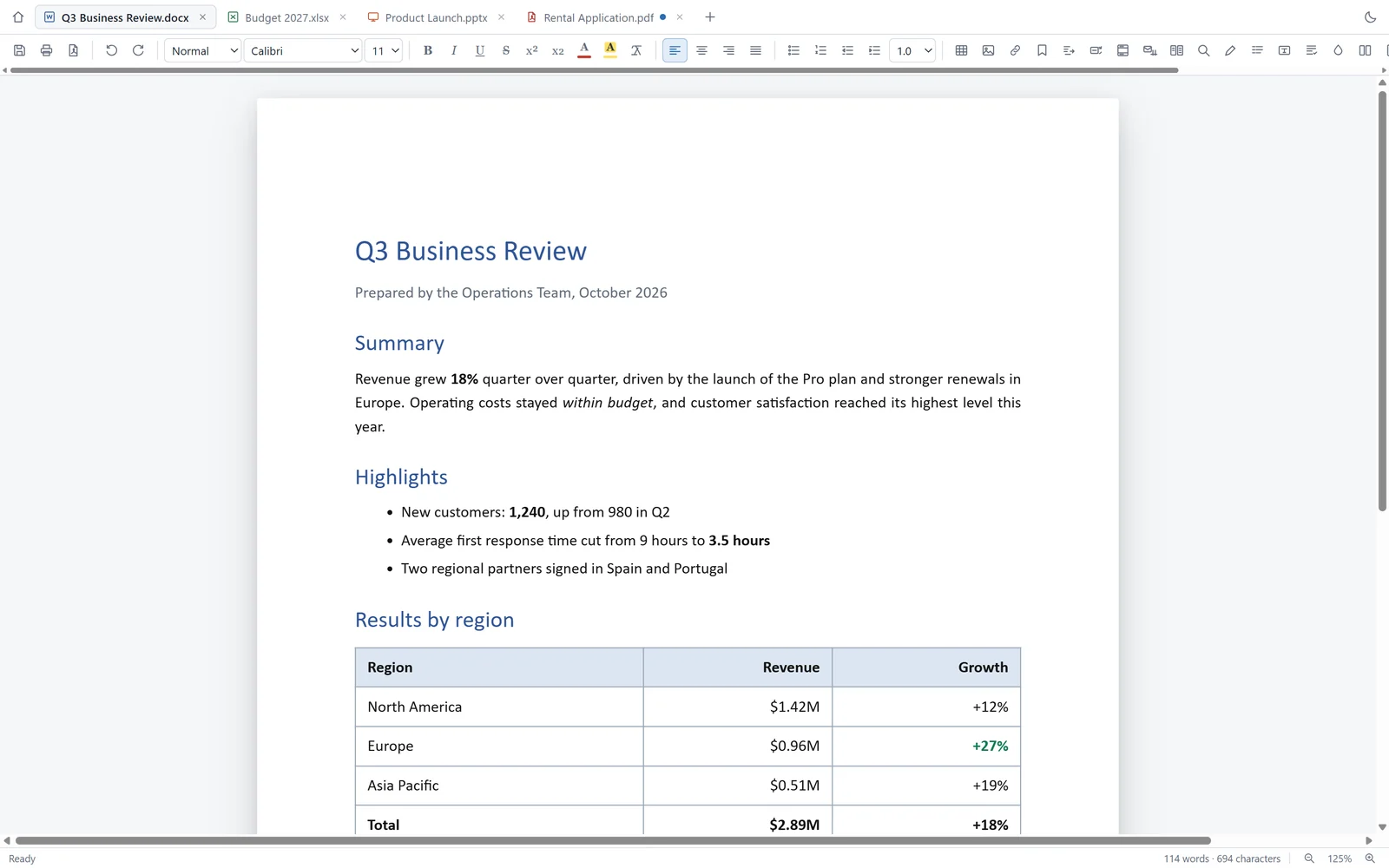
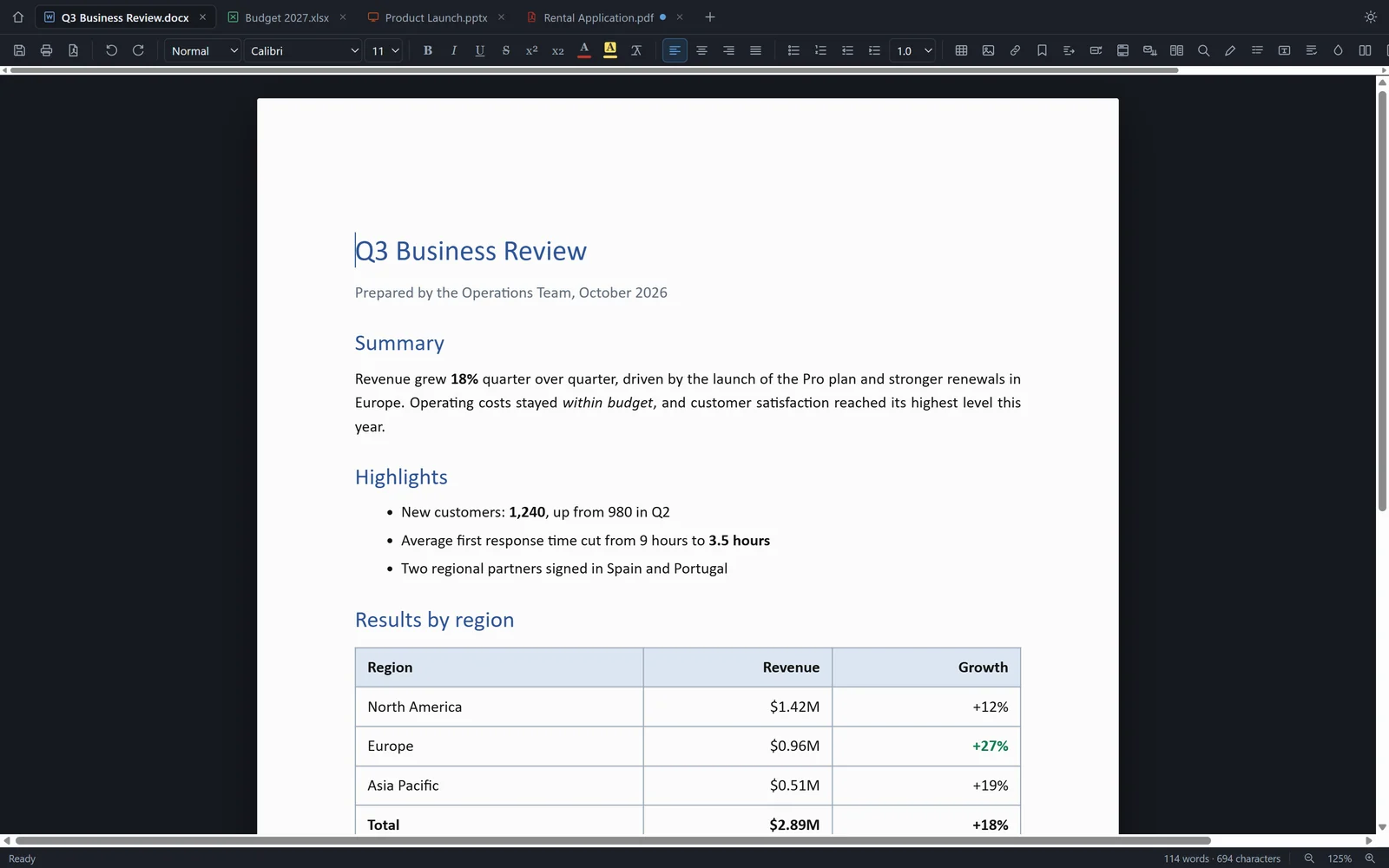
Freefull Office with four documents open in tabs, showing a Word report titled Q3 Business Review with headings, a bulleted list and a table of revenue by region.
A Word report, an Excel budget, a slide deck and a PDF form, open side by side as tabs in one window.
  • Opens .docx, .xlsx, .pptx, .pdf, .csv and .txt
  • No account, no subscription, no ads
  • Works offline; files stay on your computer
  • English, Spanish, French and Turkish
  • Windows 10 and 11, 64-bit
  • macOS 12 or newer, Apple silicon and Intel

What it does

Four document types, one window. Each opens in its own tab, with a toolbar made for it.

Word documents

Headings, lists, tables, images, text boxes, headers and footers, footnotes, comments and tracked changes. Page size, margins and orientation. Export to PDF.

Excel workbooks

More than 140 functions with dynamic arrays, charts, conditional formatting, filters, grouping and subtotals, named ranges and a summary-table tool. CSV too.

PowerPoint presentations

Edit text, tables, shapes and images, drag slides into order, set transitions and the deck's design, then present full screen with speaker notes.

PDF forms and signatures

Fill in form fields, add text, highlights, drawings, images and your signature on top of any page. Merge, split, rotate and reorder pages into a new file.

Saving that keeps your files intact

An existing file is updated in place: the parts you did not touch, such as themes, charts and untouched slides, are kept as they were. A failed save never leaves a half-written file behind.

Recovery after a crash

Unsaved work is written to a draft every 25 seconds. If the computer goes down, the next start offers your documents back as tabs.

Mail merge and compare

Fill a letter from an Excel or CSV list into one document, separate files or PDFs. Compare two documents paragraph by paragraph.

Templates to start from

A formal letter, a résumé, meeting notes, an invoice with tax formulas, a monthly budget and a pitch deck, written in the language you use the app in.

Plain text as well

Logs, Markdown, JSON, XML and YAML, with line numbers and automatic encoding detection. Light and dark themes, and keyboard shortcuts you already know.

A closer look

Real screenshots of version 1.6.0. Nothing here is a mock-up.

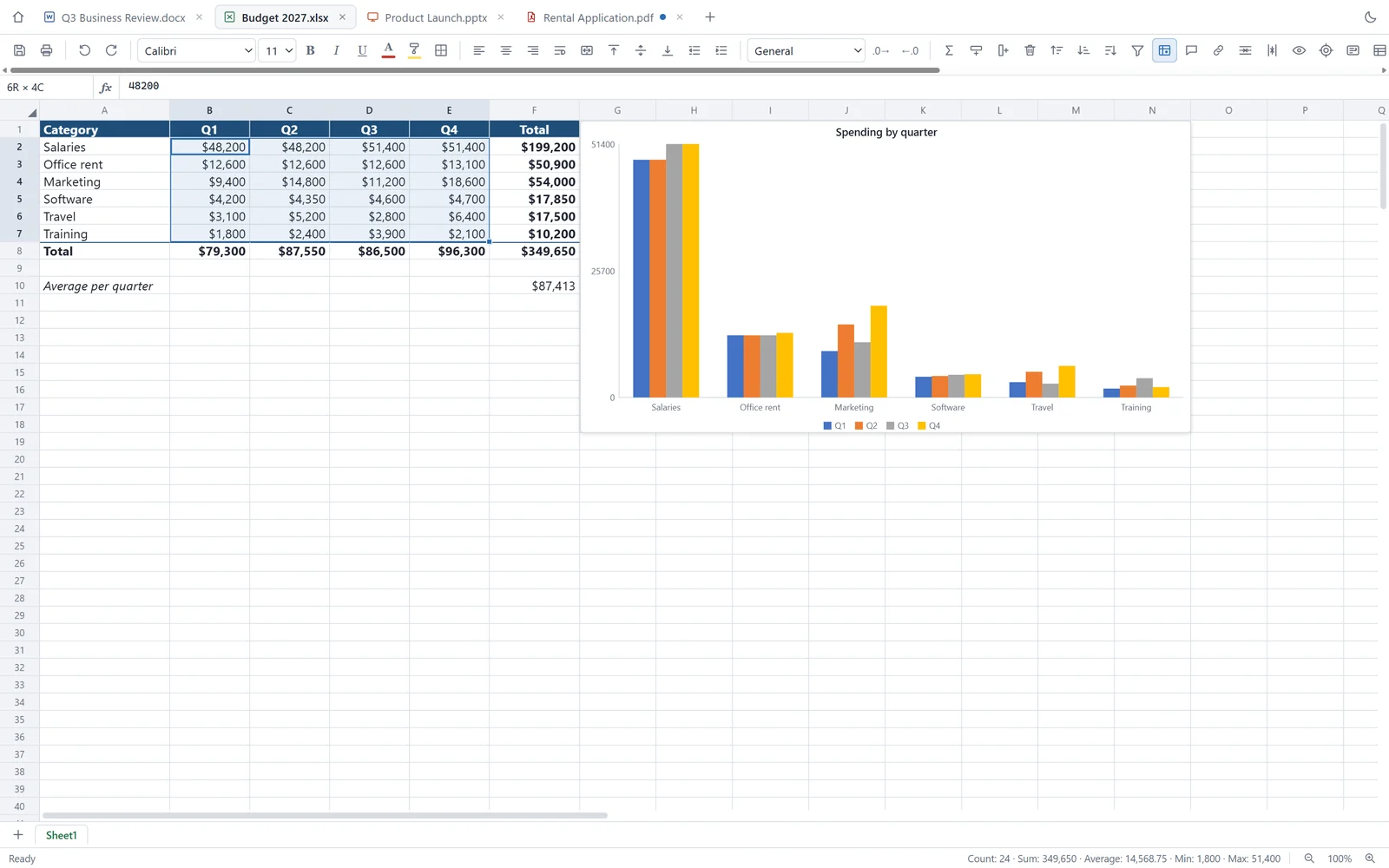
Freefull Office showing an Excel budget with quarterly figures in dollars, a total row and a clustered column chart titled Spending by quarter.
An Excel budget with SUM formulas, currency formatting and a chart made from the selection. The status bar adds up whatever you select.
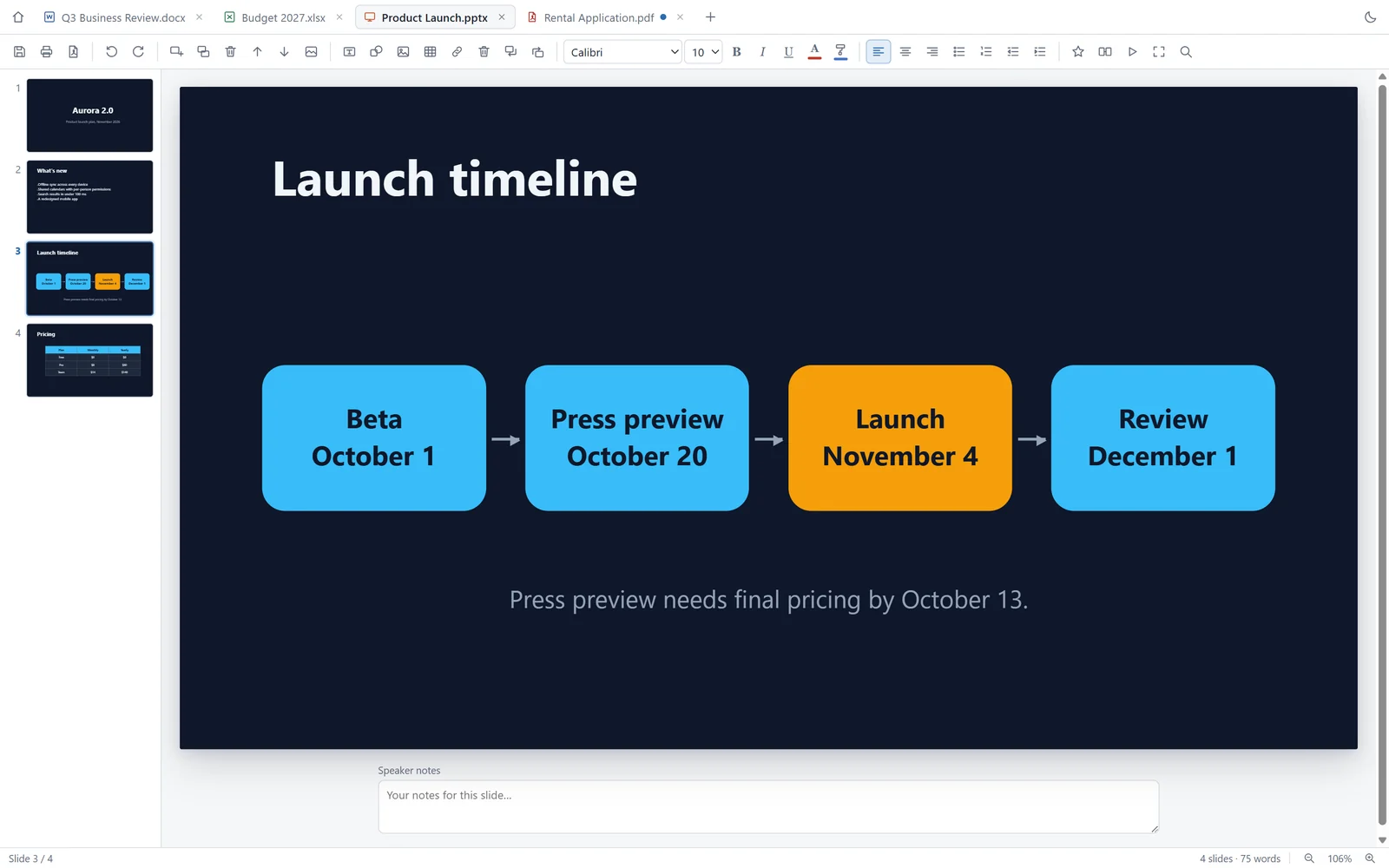
Freefull Office editing a dark presentation slide titled Launch timeline, with four rounded boxes joined by arrows and slide thumbnails on the left.
A presentation with its own design, shapes and arrows. Slide thumbnails on the left, speaker notes underneath.
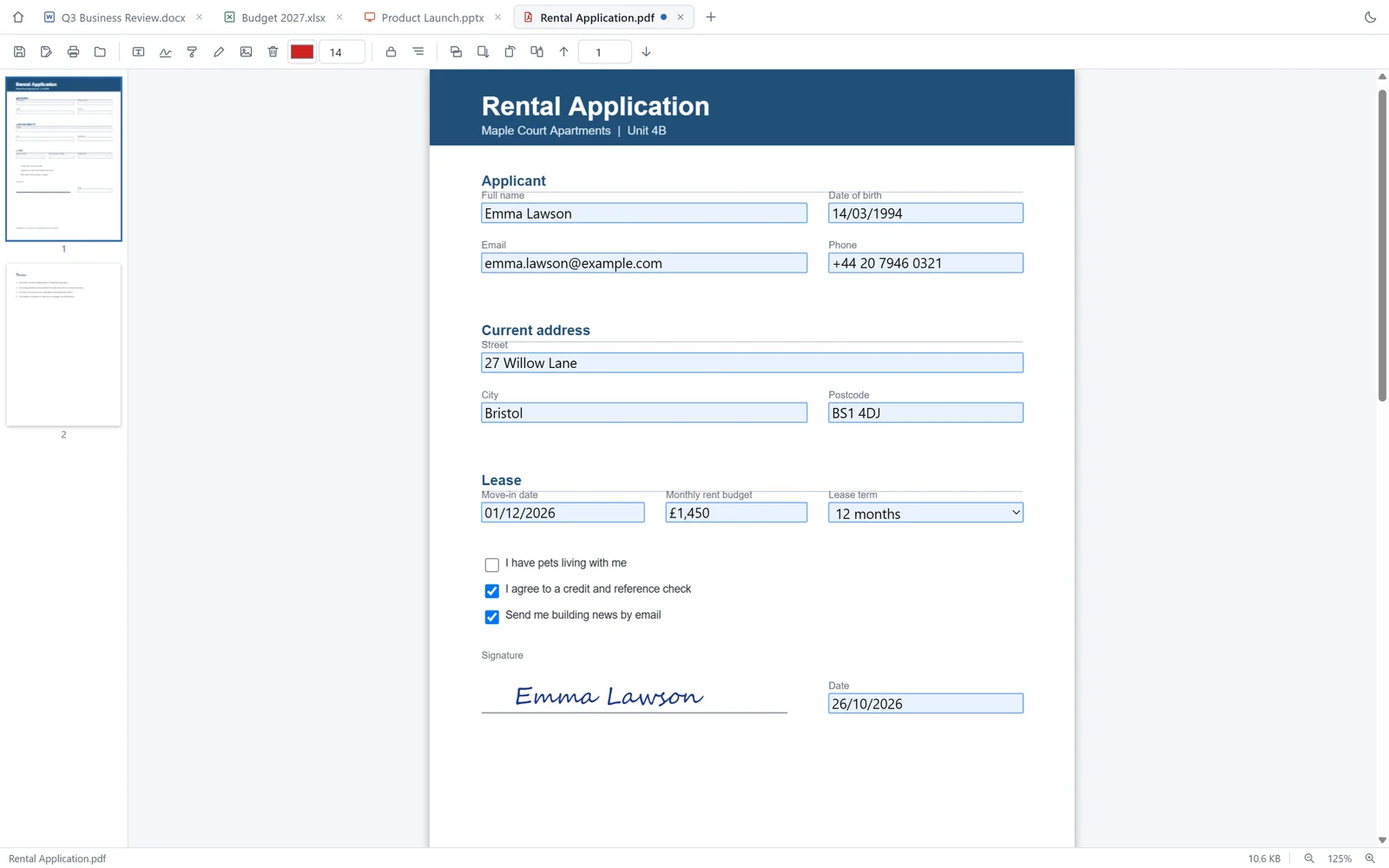
Freefull Office showing a filled-in PDF rental application form with text fields, ticked checkboxes, a dropdown and a handwritten signature.
A PDF form filled in and signed. Form fields become real inputs, and the signature is drawn with the pen and saved into the file.
Freefull Office in the dark theme, editing a Word report with headings, a bulleted list and a table of results by region.
The dark theme, here on the same Word report. It switches with one click and remembers your choice.

Good to know before you switch

It covers what most people do with office files every day. These are the things it does not do, so nobody finds out halfway through a deadline.

  • Old binary .doc and .ppt files do not open; save them as .docx or .pptx first. Old .xls and .xlsb workbooks open, and are saved as .xlsx.
  • No macros and no live pivot tables. The summary-table tool writes calculated values instead.
  • In a PDF you add on top of the page and fill in forms; the existing text cannot be edited. There is no OCR and no certificate-based e-signature.
  • Where you edit, a few rich features are simplified: floating text boxes become in-line, and animations on an edited slide are dropped. Everything you do not touch is kept as it was in the file.
  • Calibri only exists on Windows. On a Mac the app uses Carlito, a free font with the same letter widths, so text flows the same way.
  • English and Turkish are written by hand. The Spanish and French interface was machine-assisted; corrections are welcome by email.

Installing it

On Windows

  1. 1

    Run Freefull-Office-Setup-1.6.0.exe.

  2. 2

    If Windows says "Windows protected your PC", choose More info, then Run anyway. The installer is not code-signed yet, and SmartScreen shows this for any new download until it has built up a reputation.

  3. 3

    Keep the suggested folder or pick another. Setup adds Start menu and desktop shortcuts, and offers to open .docx, .xlsx, .pptx, .pdf, .csv and .txt files.

Rather not install anything? The portable version is a single .exe that runs from any folder or a USB stick.

On a Mac

  1. 1

    Open Freefull-Office-1.6.0-universal.dmg and drag Freefull Office into your Applications folder.

  2. 2

    Open it from Applications. It is signed with an Apple Developer ID and notarized by Apple, so macOS opens it without the "unidentified developer" warning. One download runs natively on both Apple silicon and Intel Macs.

Updates. The installed app checks for a new version and downloads it in the background. It installs only when you say so, because installing closes the app and you might have unsaved documents open. The portable version does not update itself; download the new one from this page.

What it sends, and how to turn it off

Your documents never leave your computer. The app has no account, no analytics and no advertising. It does make two kinds of network request, and here is exactly what they carry.

Error reports

When something goes wrong (a crash, a file that will not open, the window freezing) the app sends a short report so the bug can be found and fixed. It contains the error message and where in the code it happened, the app, Electron and operating-system versions, the name of the last command you used, which kinds of document were open (for example "Excel, 2 files") and a random installation ID. It also notes when opening or saving took longer than 15 seconds, when an old .xls file was opened, and when unsaved work is found at start-up after a crash.

It never sends the contents of your documents, file names or folder paths; paths are masked before anything leaves your computer. Reports go to a small error service we run on Cloudflare, which does not store your IP address, and they are used only to fix bugs.

To turn it off: untick Help → Send Error Reports. Anything still waiting to be sent is deleted at the same moment.

Update checks

The installed app asks GitHub, where the release files are published, whether a newer version exists: at start-up and every six hours. The request carries nothing about you or your files beyond what any web request does. The portable version does not check.

  • No account, no sign-in, no email required
  • No analytics and no advertising
  • Documents are opened and saved on your own computer only
  • Works fully offline; error reports simply wait until you are back online

The site-wide privacy page has the same detail.

Version history

1.6.0

Current October 2026
  • PDF editing: fill in forms, sign, highlight, draw, and add text or images on any page.
  • The interface is now available in English, Spanish, French and Turkish, and follows your system language.
  • Mac version signed and notarized by Apple; a single download for Apple silicon and Intel.
  • Error reports can be switched off from the Help menu.

Built with Electron, PDF.js, pdf-lib, ExcelJS, SheetJS and JSZip, all open-source projects, with thanks. The Carlito font is included under the SIL Open Font License.

Freefull Office is independent software. It is not affiliated with, endorsed by or sponsored by Microsoft. Word, Excel, PowerPoint and Microsoft Office are trademarks of Microsoft Corporation and are named here only to say which file formats the app opens.
Your documents, without a subscription

Free in full, for Windows and Mac. Nothing to sign up for.

Found a bug? Write to [email protected]